ICG

ICG Connect System

User Manual

VI-CON-SYS-02 AB

Cover Image

i Corporate Headquarters

  • Columbia Centre III, 9525 Bryn Mawr Avenue, Rosemont, IL 60018 • U.S.A.
  • 847.288.3300 • FAX: 847.288.3703
  • Service phone number: 800.351.3737 (toll-free within U.S.A., Canada)
  • Global Website: www.lifefitness.com
International Offices

AMERICAS

North America

Life Fitness, LLC

EUROPE, MIDDLE EAST, and AFRICA (EMEA)

Belgium, Netherlands, and Luxemburg

Life Fitness (Atlantic) B.V.

All Other EMEA Countries and Distributor Business EMEA*

Life Fitness (Atlantic) B.V.

Brazil

Life Fitness Brasil

United Kingdom

Life Fitness UK LTD

ASIA PACIFIC (AP)

Japan

Life Fitness Japan, Ltd

Latin America and Caribbean*

Life Fitness, LLC

Germany, Austria, and Switzerland

Life Fitness Europe GMBH

Hong Kong

Life Fitness Asia Pacific LTD


Spain

Life Fitness IBERIA

All Other Asia Pacific countries and distributor business Asia Pacific*

Life Fitness Asia Pacific LTD

*Also check www.lifefitness.com for local representation or distributor/dealer

ii User and Service Documents Link

https://lfn.fit/KnowledgeBase

https://lfn.fit/PartStore

Additional information is available online using the links above.

English

.تتوفر معلومات إضافية على الإنترنت باستخدام الرابط أعلاه

Arabic, Saudi Arabia, Primary

点击上面的链接可在线获取更多信息。

Chinese, Simplified, Primary

Flere oplysninger er tilgængelige online gennem linket ovenfor.

Danish

Bijkomende informatie is online beschikbaar via bovenstaande link.

Dutch

Vous trouverez plus d'informations en ligne à l'aide du lien ci-dessus.

French

Zusätzliche Informationen finden Sie online über den oben angegebenen Link.

German

Ulteriori informazioni sono disponibili online utilizzando il link sopra riportato.

Italian

追加情報は上記リンクを使用してオンラインで利用可能です。

Japanese

상기 링크를 통해 온라인에서 추가 정보를 볼 수 있습니다.

Korean

Informações adicionais estão disponíveis on-line, através do link acima.

Portuguese, Brazil, Primary

Дополнительная информация доступна в интернете по ссылке, указанной выше.

Russian

Mediante el enlace anterior podrá acceder a información adicional en línea.

Spanish

Ytterligare information finns online genom att använda länken ovan.

Swedish

İnternet üzerinden daha fazla bilgi edinmek için yukarıdaki bağlantıyı kullanabilirsiniz.

Turkish

.هناك معلومات إضافية متاحة على الإنترنت باستخدام الرابط أعلاه

Arabic,Standard, Secondary

Informazio osagarria eskuragarri dago goiko estekaren bidez.

Basque

Допълнителна информация можете да намерите онлайн, като използвате връзката по-горе.

Bulgarian

Mitjançant l'enllaç anterior podreu accedir a informació addicional en línia.

Catalan

使用上面的連結線上提供額外資訊。

Chinese, Traditional, Secondary

Dodatne informacije možete pronaći na internetu sljedeći vezu iznad.

Croatian

ከላይ የተቀመጠውን አገናኝ(ሊንክ) በመጠቀም መረጃዎች ኦንላይን ያገኛሉ፡፡

Ethiopian

Lisätietoja on saatavissa verkosta käyttämällä yllä olevaa linkkiä.

Finnish

Wubetumi anya nsɛm afoforo aka ho wɔ wɛbsait so denam asɛm a ɛwɔ atifi hɔ a wubemia so so.

Ghana

Πρόσθετες πληροφορίες είναι διαθέσιμες ονλάιν χρησιμοποιώντας το σύνδεσμο παραπάνω.

Greek

.מידע נוסף אפשר לקבל באינטרנט באמצעות הקישור לעיל

Hebrew

További információ elérhető online, a fenti hivatkozás segítségével.

Hungarian

Viðbótarupplýsingar eru fáanlegar á netinu með því að smella á tengilinn hér fyrir ofan.

Icelandic

Plus indicium per superum situm potes invenire.

Latin

മുകളിലുള്ള ലിങ്ക് ഉപയോഗിച്ച് ഓൺലൈനിൽ കൂടുതല് വിവരങ്ങൾ ലഭ്യമാണ്.

Malayalam

Ytterligere informasjon er tilgjengelig på nettet via linken ovenfor.

Norwegian Nyorsk

Dodatkowe informacje są dostępne online pod powyższym odnośnikiem.

Polish

Informações adicionais estão disponíveis online a usar o link acima.

Portuguese, Portugal, Secondary

Informații suplimentare sunt disponibile online, utilizând link-ul de mai sus.

Romanian

Dodatne informacije dostupne su na mreži putem gornjeg linka.

Serbian

Ďalšie informácie sú dostupné online na vyššie uvedenom odkaze.

Slovak

TradeMarkList Gym Wipes, PureGreen 24, Polar

Life Fitness® is a registered trademark.

Gym Wipes® is a registered trademark of the 2XL Corporation. PureGreen 24 is a trademark of Pure Green. Polar® is a registered trademark of Polar Electro Inc.

Chapter 1: Getting Started

1.1: Safety Instructions

Read all instructions before use.

Caution: RISK OF ELECTRIC SHOCK. DO NOT OPEN! High voltage is present within the enclosure. Do not open the housing. Only trained and qualified service technicians may service the ICG Connect System.
Warning: To prevent damage, do not move the unit while the Power, HDMI, or Ethernet Cables are connected to the system.
Warning: To prevent risk of electric shock or fire, do not allow this system to become wet. Do not expose the ICG Connect System to moist environments, and do not place liquid filled containers on or near the unit.
Attention: To prevent a risk of electric shock, be sure the power plug is fully and correctly inserted into the wall socket.
Warning: The training equipment can be used by children aged from 14 years and above and persons with a lack of experience and knowledge if they have been given supervision or instruction concerning use of the appliance in a safe way and understand the hazards involved. Persons with reduced physical, sensory, or mental capabilities are prohibited from using the training equipment. Children shall not play with the training equipment. Cleaning and user maintenance shall not be made by children without supervision.

MEDICAL DISCLAIMER! Not all exercise programs are suitable for everyone. Please consult your physician before beginning this or any other exercise program. ICG Connect programs are designed for fit, healthy, able-bodied users. Any action in response to the instructions provided in this program is at user discretion. You should always warm up for a few minutes before beginning any workout, and you should never exercise beyond the level at which you feel comfortable. The usage of a heart rate monitor is highly recommended! If at any time you feel you are exercising beyond your current fitness abilities, or you feel discomfort, you must stop your workout immediately! The user assumes all risk of injury in the use of this program.

  • It is the sole responsibility of the owner / operator and his / her staff to ensure that all users are informed of all warnings and precautions prior to using the ICG Connect System.
  • Position the ICG Connect System next to the Indoor Cycle on a level surface as recommended in the installation guide. Be sure there is enough space around the ICG Connect System to mount, dismount and operate the equipment safely.
  • ICG Connect System is intended for indoor use only. Keep the equipment away from moisture and dust. Do not place the training equipment in a garage, covered patio, near water or pools. Operating temperature of the equipment must be between 59°F – 77°F / 15°C – 25°C at max. humidity of 65%.
  • Regularly inspect all parts of the ICG Connect System. Please replace defective parts immediately and do not use the equipment until repairs are carried out. Only use original parts from the manufacturer.
  • Keep unattended children away from the ICG Connect System.
  • To ensure the level of safety of the ICG Connect System a regular maintenance is mandatory.

1.2: Installation Requirements

The following requirements must be met for installation and use of the ICG Connect System.

Power Outlets

The ICG Connect System requires one power outlet with 110 / 220 VAC output.

WASP Installation

The ICG Connect System requires installation of the Cat 5 or better network cables for optimal positioning of the supplied WASP's. The layout of the indoor cycling area may vary from facility to facility and therefore the sourcing of the network cables and installation is the responsibility of the customer.

Network Cable Requirements (WASP's)

Cat 5 or better network cables / Max. cable length: 164 feet / 50 meters not included in scope of delivery.

The WASP's should be positioned for optimal coverage of the indoor cycling area with no greater distance than approximately 16.4 feet / 5 meters in direct line of sight to the furthest bike for best results.

WASP's mounted on walls
WASP's mounted on ceiling
Item Description Qty.
1 WASP's mounted on walls 2
2 WASP's mounted on ceilings 2

1.3: Example Layout

Example of an Indoor Cycling Area Layout
Item Description Qty.
1 TV / External Video Device 1
2 HDMI Cable 1
3 Optional Internet Cable 1
4 WASP Network Cable 2
5 WASP 2
6 Power Cable 1
7 ICG Connect System 1
8 Trainer Bike 1

1.4: WASP Mounting Template

The WASP's can be mounted according to this drilling template (hardware not included).

Image not shown to scale

Chapter 2: Product Overview

2.1: Turn On the ICG Connect System

  1. Make sure the system is connected properly. The ICG Connect System must be connected to an external video device with 1080P via high speed HDMI cable.
  2. Turn on your external video device.
  3. Turn on the unit with the main power switch on the back of the base of the unit.
    Note: Pushing the Restart button will turn off the Mini PC only. To turn off the complete system, the main power switch must be used.
    Item Description Qty
    1 Main Power Switch 1
    2 Restart Button 1
  4. The system takes approximately 90 seconds to fully boot. The ICG logo will appear on the external video device and the tablet will show the home screen.

2.2: Settings Menu

You will need to enter the setup menu to set up the time, activate demo mode and install updates on your ICG Connect System. Do not make any adjustments to the system not outlined in this manual.
  1. Press the MENU button on the lower right-hand corner of the screen.
  2. Confirm the prompt FOR STAFF USE ONLY.
  3. Enter the password: 4, 3, 2, 1 and confirm.

2.3: Settings

Time and Date Setup

In the SETTINGS menu, tap the Time button and make your local adjustments and exit the menu with the Back button.

Language

Tap the Language button to change your language preferences.

Metric

The ICG Connect System can be used with either Metric or Imperial units. When the button next to the Metric is green, Metric units are used. When the button is gray, Imperial units are used. Tap the Metric button to toggle between Metric or Imperial units.

HDMI Audio

Some videos (ambient sound) or introductions to World Tour Videos have sound, but no music. When HDMI Audio is selected, the external video device will play the sound provided the device has a speaker. If not activated, sound output is through the audio jack on the base of the system but is generally not required as the trainer will play their music during the workout.

Demo Mode

When activated and the button is green, the demo mode will simulate user data from 20 bikes and display the information on the tablet and external video device. Live user data from the bikes will not be displayed.

System Information

The system information tab has software version details for the tablet and the internal mini PC. When requesting support, always provide the APP VERSION and the SERVER_VERSION.

Item Description Qty.
1 APP VERSION 1
2 SERVER_VERSION 1

2.4: Control Panel Adjustment

Adjust Tilt Angle

The control panel can be tilted from vertical to maximum 65°.

If the resistance when tilting the tablet should become too loose, tighten the bolt inside the bracket using a 5 mm Allen wrench.

Item Description Qty.
1 Bracket 1
2 Bolt 1
3 5 mm Allen Wrench 1

Tighten hardware to 7.4 ft-lb / 10 Nm).

Adjust Pivot Angle

The control panel can be swiveled horizontally to a maximum of 260° from limit stop to limit stop.

Chapter 3: Assembly

3.1: Tools Required

  • 3 mm Allen wrench
  • Flat head screwdriver
  • Utility knife
  • Side cutter

3.2: Unboxing

  1. Position the box on side as shown.
  2. Cut packing tape using a utility knife.
  3. Lift the ICG Connect System from the box.
    Note: Remove contents from inside the Styrofoam packaging.

3.3: Assembly Procedure

3.3.1: Contents

Item Description Qty.
1 Pre-Assembled ICG Connect System 1
2 ICG Connect System Power Cables
  • Europe: CEE 7/7 Type F
  • US: NEMA-5 Type B
  • UK: BS 1363
  • AU: AS 3112 Type I
4
3 WASP (Receiver for ANT data from IC3, IC5, IC6, IC7, and IC8 indoor cycles) 2
4 CAT 5 RJ45 Network Cables, for testing system functionality, 1 Meter (3 Feet) 2
Not Included with the ICG Connect System
Indoor Cycles
The ICG Connect System only works with IC3, IC5, IC6, IC7, and IC8 series bikes.
External video device:
  • TV or Projector
  • Resolution: 1080P
  • Input: HDMI 1.3
External video device cable:
  • High Speed HDMI Cable
  • Maximum length 32 feet / 10 meters
WASP Network cables
Cat 5 or better network cables / Maximum cable length: 164 feet / 50 meters not included in scope of delivery.
Network Cable / Connection to Internet for updating
The ICG Connect System does not require an internet connection for operation. A connection is optional for software updates. Software updates can also be installed by downloading the required file to a USB Flash drive.

3.3.2: Assembly and Cable Connections

  1. Remove hex head screw from the rear of the base using a 3 mm Allen wrench.
    Item Description Qty.
    1 Base 1
    2 Hex Head Screw 1
  2. Pull the panel from the right side to remove. The panel is hinged on the left side.
    Item Description Qty.
    1 Base 1
    2 Panel 1
    3 Hinge 1
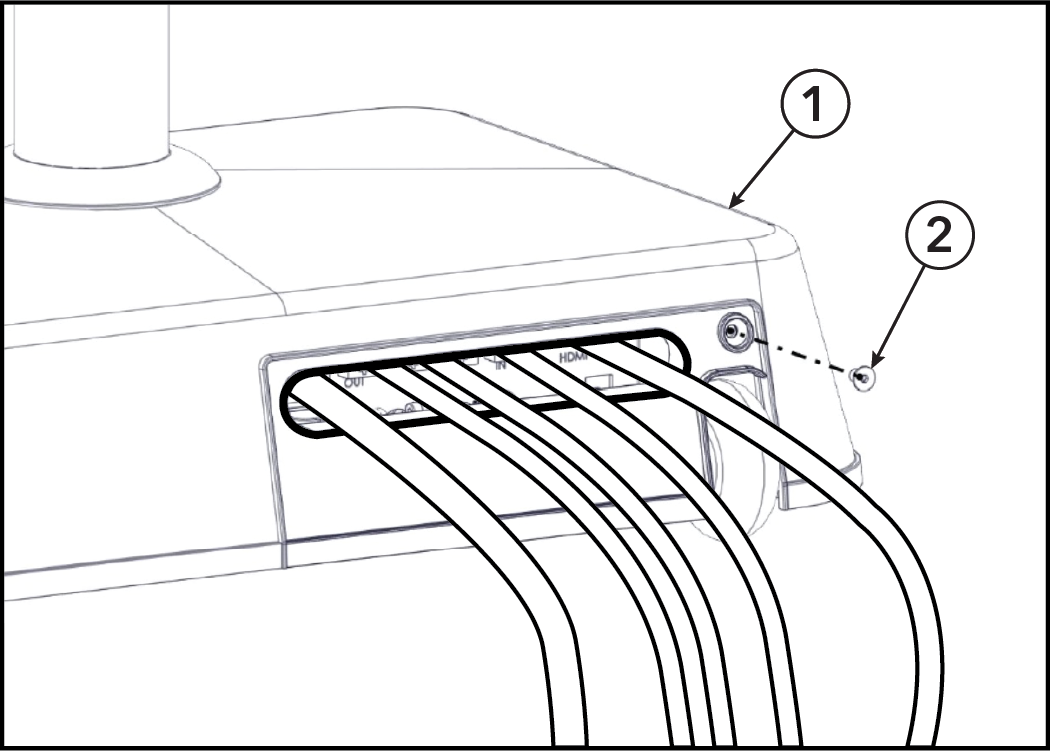
  3. Slide the power cable, HDMI cable, both network cables for the WASP's and the optional network cable for updates through the slot of the removable cover.
    Note: Power cables vary by region.
    Item Description Qty.
    1 Power Cable 1
    2 Cat 5 or Better RJ45 Cables for the WASP's (Maximum 164 feet / 50 meters) 2
    3 Cat 5 or Better RJ45 Cables for the Optional Internet Connection for Updates 1
    4 High Speed HDMI Cable (Maximum 32 feet / 10 meters) 1
  4. Plug the power cable into the power socket.
  5. Connect the HDMI cable of your TV or external video device into the connector panel labeled HDMI.
  6. Plug in the network cables for the WASP's into the RJ45 sockets marked OUT. The system can support up to 3 WASP's but only 2 are required for most facilities. Additional WASP's sold separately.
  7. If you would like to connect the system via your network to the internet, you can do so using a network cable plugged into the RJ45 socket marked IN.
    Item Description Qty.
    1 Power Cable 1
    2 Cat 5 or Better RJ45 Cables for the WASP's (Maximum 164 feet / 50 meters) 2
    3 Cat 5 or Better RJ45 Cables for the Optional Internet Connection for Updates 1
    4 High Speed HDMI Cable (Maximum 32 feet / 10 meters) 1
  8. Refit panel and install hex head screw to the rear of the base using a 3 mm Allen wrench.
    Item Description Qty.
    1 Base 1
    2 Hex Head Screw 1
  9. Remove four screws securing lid to the WASP using a flat head screwdriver.
    Item Description Qty.
    1 Lid 1
    2 WASP 1
    3 Screw 4
  10. Gently pop the rear cover off the WASP using a large flat head screwdriver.
  11. Cut the plastic of the WASP housing at the pre-scored sections, using side cutters.
  12. Route the network cable through the newly cut gap and pop the rear cover back in place.
  13. Plug in the other end of the network cables from the ICG Connect System to the WASP's.
    Item Description Qty.
    1 Lid 1
    2 Network Cable 1
  14. Refit the lid on the WASP, securing the four screws using a large flat head screwdriver.
    Item Description Qty.
    1 Lid 1
    2 WASP 1
    3 Screw 4
Warning: Installed WASP's and Cat 5 or better network cables from an older MYRIDE CONNECT can be used for the ICG Connect System but the old POE's must be removed before use.

Chapter 4: Maintenance

4.1: Approved and Compatible Cleaners

Two preferred cleaners have been approved by reliability experts: PureGreen 24 and Gym Wipes. Both cleaners will safely and effectively remove dirt, grime and sweat from equipment. PureGreen 24 and the Antibacterial Force formula of Gym Wipes are both disinfectants that are effective against MRSA and H1N1.

PureGreen 24 is available in a spray which is convenient for gym staff to use. Apply the spray to a microfiber cloth and wipe down the equipment. Use PureGreen 24 on the equipment for at least 2 minutes for general disinfection purposes and at least 10 minutes for fungus and viral control.

Gym Wipes are large, durable pre-moistened wipes to use on the equipment before and after workouts. Use Gym Wipes on the equipment for at least 2 minutes for general disinfection purposes.

Contact Customer Support Services to order these cleaners (1-800-351-3737 or email: customersupport@lifefitness.com).

Mild soap and water or a mild non-abrasive household cleaner can also be used to clean the display and all exterior surfaces. Use a soft microfiber cloth only. Apply the cleaner to the microfiber cloth before cleaning. DO NOT use ammonia or acid based cleaners. DO NOT use abrasive cleaners. DO NOT use paper towels. DO NOT apply cleaners directly to the equipment surfaces.

4.2: Cleaning the ICG Connect System

Lightly dampen a section of a microfiber cloth with water and gently wipe the screen, then go over it again with a dry section of the cloth to wipe away any moisture.

Avoid getting moisture in any openings like the speaker or mic. If the stain remains, you can also try using a mild soap and water solution.

Chapter 5: Schematics

5.1: Schematic - Connections

Item Description Qty.
1 Power Cable 1
2 Cat 5 or Better RJ45 Cables for the WASP's (Maximum 164 feet / 50 meters) 2
3 Cat 5 or Better RJ45 Cables for the Optional Internet Connection for Updates 1
4 High Speed HDMI Cable (Maximum 32 feet / 10 meters) 1

Chapter 6: Specifications

6.1: Specifications

Assembled dimensions: 22 x 14 x 46 in / 53.5 x 36 x 116 cm
Assembled weight: 51 lbs. / 23 kg.
Operating system (OS): ICG customized Linux OS
Computer: AMD Ryzen R1505 APU
Aspect ratio: 16:9 (external screen)
Screen viewing position: Adjustable - Tilt and pivot (rotation)
Video resolution: Full HD 1080p
Software update: Internet via ethernet cable / USB flash drive
USB: 1 x 2.0
HDMI: 1 x 1.3
Audio port: 1 x 3.5mm input
Ethernet port: RJ45
Display type: 15.6 in / 39 cm IPS panel with capacitive touch
Power requirements: 110 - 220 VAC input
Leveling feet: 2
Transport wheels: 2