SCIFIT

Treadmill_Touchscreen_Manual.ditamap

Intelli-Fit Treadmill

Touchscreen User Manual

A6872 D

Cover Image

i Corporate Headquarters

  • Columbia Centre III, 9525 Bryn Mawr Avenue, Rosemont, IL 60018 • U.S.A.
  • 847.288.3300 • FAX: 847.288.3703
  • Service phone number: 800.351.3737 (toll-free within U.S.A., Canada)
  • Global Website: www.lifefitness.com
International Offices

AMERICAS

North America

SCIFIT

EUROPE, MIDDLE EAST, and AFRICA (EMEA)

Belgium, Netherlands, and Luxemburg

Life Fitness (Atlantic) B.V.

All Other EMEA Countries and Distributor Business EMEA*

Life Fitness (Atlantic) B.V.

Brazil

Life Fitness Brasil

United Kingdom

Life Fitness UK LTD

ASIA PACIFIC (AP)

Japan

Life Fitness Japan, Ltd

Latin America and Caribbean*

Life Fitness, LLC

Germany, Austria, and Switzerland

Life Fitness Europe GMBH

Hong Kong

Life Fitness Asia Pacific LTD


Spain

Life Fitness IBERIA

All Other Asia Pacific countries and distributor business Asia Pacific*

Life Fitness Asia Pacific LTD

*Also check www.SCIFIT.com for local representation or distributor/dealer

* Order online 24/7 at www.SCIFIT.com

ii User and Service Documents Link

https://lfn.fit/KnowledgeBase

https://lfn.fit/PartStore

Additional information is available online using the links above.

English

.تتوفر معلومات إضافية على الإنترنت باستخدام الرابط أعلاه

Arabic, Saudi Arabia, Primary

点击上面的链接可在线获取更多信息。

Chinese, Simplified, Primary

Flere oplysninger er tilgængelige online gennem linket ovenfor.

Danish

Bijkomende informatie is online beschikbaar via bovenstaande link.

Dutch

Vous trouverez plus d'informations en ligne à l'aide du lien ci-dessus.

French

Zusätzliche Informationen finden Sie online über den oben angegebenen Link.

German

Ulteriori informazioni sono disponibili online utilizzando il link sopra riportato.

Italian

追加情報は上記リンクを使用してオンラインで利用可能です。

Japanese

상기 링크를 통해 온라인에서 추가 정보를 볼 수 있습니다.

Korean

Informações adicionais estão disponíveis on-line, através do link acima.

Portuguese, Brazil, Primary

Дополнительная информация доступна в интернете по ссылке, указанной выше.

Russian

Mediante el enlace anterior podrá acceder a información adicional en línea.

Spanish

Ytterligare information finns online genom att använda länken ovan.

Swedish

İnternet üzerinden daha fazla bilgi edinmek için yukarıdaki bağlantıyı kullanabilirsiniz.

Turkish

.هناك معلومات إضافية متاحة على الإنترنت باستخدام الرابط أعلاه

Arabic,Standard, Secondary

Informazio osagarria eskuragarri dago goiko estekaren bidez.

Basque

Допълнителна информация можете да намерите онлайн, като използвате връзката по-горе.

Bulgarian

Mitjançant l'enllaç anterior podreu accedir a informació addicional en línia.

Catalan

使用上面的連結線上提供額外資訊。

Chinese, Traditional, Secondary

Dodatne informacije možete pronaći na internetu sljedeći vezu iznad.

Croatian

ከላይ የተቀመጠውን አገናኝ(ሊንክ) በመጠቀም መረጃዎች ኦንላይን ያገኛሉ፡፡

Ethiopian

Lisätietoja on saatavissa verkosta käyttämällä yllä olevaa linkkiä.

Finnish

Wubetumi anya nsɛm afoforo aka ho wɔ wɛbsait so denam asɛm a ɛwɔ atifi hɔ a wubemia so so.

Ghana

Πρόσθετες πληροφορίες είναι διαθέσιμες ονλάιν χρησιμοποιώντας το σύνδεσμο παραπάνω.

Greek

.מידע נוסף אפשר לקבל באינטרנט באמצעות הקישור לעיל

Hebrew

További információ elérhető online, a fenti hivatkozás segítségével.

Hungarian

Viðbótarupplýsingar eru fáanlegar á netinu með því að smella á tengilinn hér fyrir ofan.

Icelandic

Plus indicium per superum situm potes invenire.

Latin

മുകളിലുള്ള ലിങ്ക് ഉപയോഗിച്ച് ഓൺലൈനിൽ കൂടുതല് വിവരങ്ങൾ ലഭ്യമാണ്.

Malayalam

Ytterligere informasjon er tilgjengelig på nettet via linken ovenfor.

Norwegian Nyorsk

Dodatkowe informacje są dostępne online pod powyższym odnośnikiem.

Polish

Informações adicionais estão disponíveis online a usar o link acima.

Portuguese, Portugal, Secondary

Informații suplimentare sunt disponibile online, utilizând link-ul de mai sus.

Romanian

Dodatne informacije dostupne su na mreži putem gornjeg linka.

Serbian

Ďalšie informácie sú dostupné online na vyššie uvedenom odkaze.

Slovak

Chapter 1: Safety

1.1: Introduction

FCC Warning - Possible Radio / Television Interference
This equipment has been tested and found to comply with the limits for a Class A digital device, pursuant to part 15 of the FCC rules. These limits are designed to provide reasonable protection against harmful interference when the equipment is operated in a commercial environment. This equipment generates, uses and can radiate radio frequency energy, and if not installed and used in accordance with the instruction manual, may cause harmful interference to radio communications. Operation of this equipment in a residential area is likely to cause harmful interference in which case the user will be required to correct the interference at his own expense.

1.2: Safety Information

Caution: Risk of injury to persons – to avoid injury, use extreme caution when stepping onto or off of a moving belt. Read the manual before using.
Caution: Any changes or modifications to this equipment could void the product warranty.
Warning: Health-related injuries may result from incorrect or excessive use of exercise equipment. It is STRONGLY recommended seeing a physician for a complete medical exam before undertaking an exercise program, particularly if the user has a family history of high blood pressure or heart disease, is over the age of 45, smokes, has high cholesterol, is obese, or has not exercised regularly in the past year. If, at any time while exercising, the user experiences faintness, dizziness, pain, or shortness of breath, he or she must stop well immediately.
Warning: To reduce the risk of burns, fire, electrical shock, or injury, it is imperative to connect each product to a properly grounded electrical outlet.
Warning: Heart rate monitoring systems may be inaccurate. Over exercising may result in serious injury or death. If you feel faint, stop exercising immediately.
Warning: Allow a distance of 80 in. (2m) between the widest part of the machine and other objects on either side. Provide 80 in (2m) between the front or rear of the SCIFIT machine to any other objects.
Warning: Be sure the emergency stop lanyard is clipped to the user and in proper position on the treadmill before beginning any workout.
Warning: The belt centering adjustment must be performed if the belt is not between the marks indicating the maximum allowed lateral positions.
Warning: This product can expose you to chemicals including Ethylbenzene, which is known to the State of California to cause cancer, and Toluene, which is known to the State of California to cause birth defects or other reproductive harm. For more information go to http://www.P65Warnings.ca.gov
Danger: To reduce the risk of electrical shock or injury from moving parts, always turn off the power switch on the machine and disconnect the power cord from the electrical outlet before cleaning or attempting any maintenance activity.
Danger: This product must be grounded. If it should malfunction or breakdown, grounding provides a path of least resistance for electric current to reduce the risk of electric shock. This product is equipped with a cord having an equipment-grounding conductor and a grounding plug. The cord must be plugged into an appropriate outlet that is properly installed and grounded in accordance with all local codes and ordinances.

Danger: Improper connection of the equipment grounding conductor can result in a risk of electric shock. Check with a qualified electrician or serviceman if you are in doubt as to whether the product is properly grounded. Do not modify the plug provided with the product. If it will not fit the outlet, have a proper outlet installed by a qualified electrician. This treadmill requires a 100-120 Volt (50 Hz or 60 Hz), 15 amp dedicated circuit. The circuit must have a minimum of 12 gauge wire. A dedicated circuit is a power outlet reserved for the exclusive use of your treadmill. This requires a power line to be routed from the main breaker box or subpanel to the power outlet for the treadmill. The outlet should not be shared with any other piece of equipment. If you have not previously arranged for such an outlet, contact a qualified electrician to have one installed. An insufficient power supply may cause your treadmill to function improperly and will void the warranty. If you have any questions, please contact customer service.
  • Life Fitness does not warrant nor guarantee that component parts used in the manufacture of products offered under the Life Fitness brand are latex-free. Users of these products must take all necessary precautions to prevent accidental contact that could lead to an adverse latex reaction.
  • Read all warnings and instructions on each product prior to using your exercise machine.
  • If warnings are missing or damaged, please contact customer service immediately for replacement warning labels. Warning labels are shipped with every product and should be installed before the product is used. SCIFIT is not responsible for missing or damaged warning labels.
  • Use the exercise machine only for its intended purposes as described in this manual. Do not use attachments not recommended by the manufacturer.
  • Never insert objects into any opening in these products. If an object should drop inside, turn off the power switch on machine, disconnect the power cord from the electrical outlet, and carefully retrieve it. If the item cannot be reached, contact customer support services..
  • This machine is intended for indoor use only. Do not place in direct sunlight, high humidity or where water is present (i.e. pool or spa areas).
  • This machine is not intended for use by persons with reduced physical sensory or mental capabilities, or lack of experience and knowledge, unless they have been given supervision or instruction concerning use of the machine by a person responsible for their safety. Keep children under the age of 14 away from this machine.
  • Never operate the machine with the air openings blocked. Keep air openings free of lint, hair, or any other obstructing material.
  • Never place liquids of any type directly on the unit, except in an accessory tray or holder. Containers with lids are recommended. Do not use this machine in bare feet. Always wear shoes. Wear shoes with rubber or high-traction soles. Do not use shoes with heels, leather soles, cleats or spikes. Make sure no stones are embedded in the soles.
  • Keep all loose clothing, shoelaces, and towels away from moving parts.
  • Do not reach into, or underneath, the unit or tip it on its side during operation.
  • Do not allow other people to interfere in any way with the user or equipment during a workout.
  • When the product is not in use, SCIFIT recommends unplugging the product. Disconnect from the electrical outlet when not in use, and before putting on or taking off parts. To disconnect, turn power OFF at the ON/OFF switch, then remove plug from electrical outlet.
  • Free standing equipment shall be installed on a stable and leveled surface.
  • Do not stand or sit on plastic shrouds.
  • Never operate the exercise machine if it has a damaged electrical power cord or plug, not working properly, or even immersed in water. Contact customer service.
  • Keep the power cord away from heated surfaces. Do not pull the equipment by the power cord or use the cord as a handle. Do not run the power cord on the floor under or along the side of the treadmill.
  • Do not use this product in areas where aerosol spray products are being used or where oxygen is being administered. Such substances create the danger of combustion and explosion.
  • Position the product so that the power cord plug to the wall is accessible to the user. Make sure that the power cord is not knotted or twisted and that it is not trapped under any equipment or other objects.
  • If the electrical supply cord is damaged, it must be replaced by the manufacturer, an authorized service agent, or a similarly qualified person to avoid a hazard.
  • Never mount or dismount the treadmill while the running belt is moving. Use the handrails whenever additional stability is required. In case of an emergency, such as tripping, grasp the handrails and place the feet on the side platforms
  • In a double-insulated product, two systems of insulation are provided instead of grounding. No grounding means is provided on a double-insulated product, nor should a means for grounding be added to the product, Servicing a double-insulated product requires extreme car and knowledge of the system, and should be done only by qualified service personnel. Replacement parts for a double-insulated product must be identical to the parts they replace. A double-insulated product is marked with the words "DOUBLE INSULATION" or " DOUBLE INSULATED" and the symbol image.

SAVE THESE INSTRUCTIONS

Chapter 2: Mantenance

2.1: Maintenance

Component Action When
Console Clean with mild soap and water. Weekly
LCD Display LCD Screen Wipes. Weekly

Chapter 3: Specifications

3.1: Specifications

Weight 6 lbs (2.7 kg)
Length 14 in. (35.6 cm)
Width 9 in. (22.9 cm)
Depth 6 in. (15.2 cm)
1 Water Bottle Holder
2 Fan Vents
3 Personal Item Compartment
4 Fit-Key Connecting Port
5 Active Touchscreen/Tactile Area
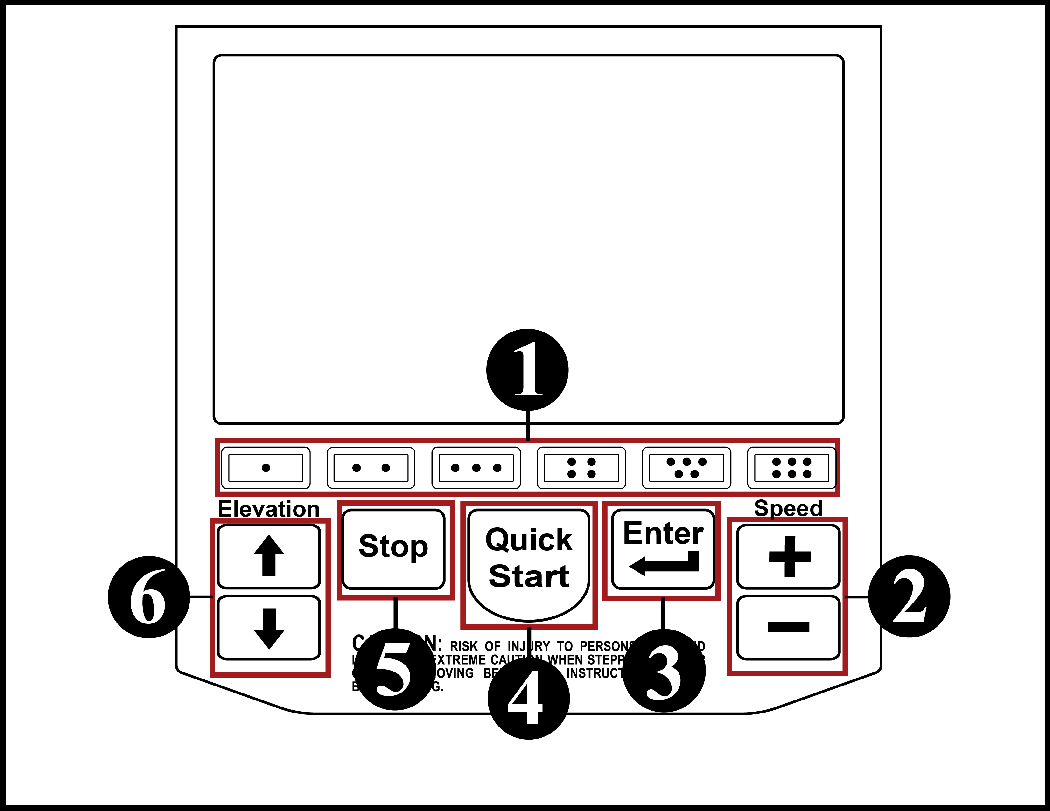
1 Selecting workout or activating a special feature.
2 Data process entry or increase/decrease the speed level.
3 Confirms user's selection during the data entry process.
4 Begins pre-programmed workout with no data entry required.
5 Stops the workout at any time.
6 Increases/decreases the treadmill elevation during a workout.
Warning: There is a time delay between pressing the console speed tactile keys, speed icons on the screen and the speed buttons on the handrails compared to the actual speed of the walk belt.
Warning: ALWAYS MONITOR THE SPEED SHOWN TO PREVENT PERSONAL HARM.

Chapter 4: Heart Rate

4.1: Heart Rate

Warning: Heart Rate monitoring systems may be inaccurate. If you feel faint, stop exercising immediately. Over exercising may result in serious injury or death.
Caution: Always follow manufacturers instructions for proper care and use. Failure to follow manufacturers instructions may result in injury to yourself.
Attention: The heart rate chest transmitter strap is required when selecting the Heart Rate, Heart Fit or Heart Fit training programs. The chest strap will not work when worn over clothing. Skin contact is necessary.

Calculating The Target Heart Rate Zone

Your approximate Maximum Heart Rate (MHR) is equal to 220 minus your age. The upper limit of your target zone is equal to 0.85 times your MHR. The lower limit of your target zone is equal to 0.60 times your MHR. These values are based upon averages, always consult your physician to establish the proper heart rate zone for your individual health condition.

Your age is 40:
  • 220 - 40 = 180
  • 180 x .85 = 153 (Target zone upper limit)
  • 108 x .60 = 108 (Target zone lower limit)

Chapter 5: Machine Program Menus

5.1: Machine Program Menus

AC5000 and DC1000

1 Quick Start
2 Manual
3 Heart Rate
4 Grade Profile
5 Speed Profile

AC5000M

1 Quick Start
2 Manual
3 Reverse
4 Heart Rate
5 Grade Profile
6 Speed Profile

Chapter 6: Workout Programs

6.1: Quick Start (AC5000/AC5000M/DC1000)

Allows the user to get on and go. The workout has no set time limit. Speed and grade (elevation) levels are manually controlled and the timer will count upward.

Adjusting Speed and Elevation:

Press the Menu icon to activate the pop-up menu at the bottom of the screen.

Grade (Elevation):

1. Press the [Grade] icon and an adjustment screen will appear.

2. Use the Up or Down arrows to adjust the grade (elevation) of the treadmill.

Speed:

1. Press the [Speed] icon and an adjustment screen will appear.

2. Use the Up or Down arrows to adjust the speed of the treadmill.

Pace:

1. Press the [Pace] icon and an adjustment screen will appear.

2. Use the Up or Down arrows to adjust the pace of the treadmill.

  • Increasing the pace time will decrease the speed of the treadmill.
  • Decreasing the pace time will increase the speed of the treadmill.

Example:

  • Pace:12 minute mile = 5 mph (8.0 kph)
  • Pace:10 minute mile = 6 mph (9.7 kph)

6.2: Manual (AC5000/DC1000) and Forward (AC5000M)

Allows the user to set the workout time, speed, grade (elevation) and user weight to begin the workout. Speed and grade (elevation) can be changed manually using the console or grade/speed buttons on the left and right handrails.
  1. Screen 1: Enter the workout length of time, then press [Accept].
  2. Screen 2: Enter the starting speed of the treadmill, then press [Accept].
    1. After accepting the speed a caution message will appear showing the speed selected and associated running pace. If you wish to continue press [Accept] or press [Cancel] to change the speed entered.
  3. Screen 3: Enter the starting grade (elevation) of the treadmill.
  4. Screen 4: Enter the user weight.
  5. COMMENCE WORKOUT

6.3: Reverse (AC5000M)

This selection makes the walk belt move in the reverse direction. The user sets the workout time, speed, grade (elevation) and user weight to begin the workout. Speed and grade (elevation) can be changed manually using the console or the grade/speed buttons on the left and right handrails. After pressing [Reverse] a warning message will appear. Press the [Stop] tactile button on the console to return to the main menu, otherwise the screen will advance to the data entry screen.
  1. Screen 1: Enter the time length of the workout.
  2. Screen 2: Enter the starting reverse speed of the treadmill (Max. 4 mph (6.4 kph)).
    1. After entering and accepting the speed a caution message will appear showing the speed selected associated running pace. if you wish to continue press [Accept]. Press [Cancel] to change the speed entered.
  3. Screen 3: Enter the starting grade (elevation) of the treadmill.
  4. Screen 4: Enter the user weight.
  5. COMMENCE WORKOUT

6.4: Heart Rate (AC5000/AC5000M/DC1000)

Enables the user to set a target heart rate. The machine maintains the heart rate within a zone by altering the intensity during the workout. ATTENTION: A heart rate transmitter chest strap is required. If you are not wearing a transmitter belt or the belt is not sending a signal correctly, after a short period of time a warning message will appear.
  1. Screen 1: Enter the time length of the workout. (Minimum workout time is 12 min. including a 2 min. warm up)
  2. Screen 2: Enter the target Heart Rate.
  3. Screen 3: Enter the starting speed of the treadmill.
    1. After entering and accepting the speed a caution message will appear showing the speed selected associated running pace. if you wish to continue press [Accept]. Press [Cancel] to change the speed entered.
  4. Screen 4: Enter the user weight.
  5. COMMENCE WORKOUT
    1. If the user's heart rate is at or above the target heart rate, no grade (elevation) or speed adjustments will be allowed.
    2. Target heart rate may be adjusted using the touchscreen menu.

6.5: Grade Profile (AC5000/AC5000M/DC1000)

Provides seven different grade (elevation) dependent workouts that may be selected. The grade will automatically adjust up or down as the workout progresses. Speed and grade can be adjusted manually during the workout.
  1. Screen 1: Enter the time length of the workout.
  2. Screen 2: Enter the selected grade profile (1 of 7).
  3. Screen 3: Enter the minimum grade wanted during the workout.
  4. Screen 4: Enter the maximum grade wanted during the workout.
  5. Screen 5: Enter the speed wanted during the workout.
    1. After entering and accepting the speed a caution message will appear showing the speed selected associated running pace. if you wish to continue press [Accept]. Press [Cancel] to change the speed entered.
  6. Screen 6: Enter the user weight.
  7. COMMENCE WORKOUT

6.6: Speed Profile (AC5000/AC5000M/DC1000)

Provides seven different speed dependent profiles that may be selected. The speed will automatically adjust faster or slower as the workout progresses. Speed and grade can be adjusted manually during the workout.
  1. Screen 1: Enter the time length of the workout.
  2. Screen 2: Enter the selected speed profile (1 of 7).
  3. Screen 3: Enter the minimum speed wanted during the workout.
  4. Screen 4: Enter the maximum speed wanted during the workout.
    1. After accepting the speed a caution message will appear showing the speed selected and associated running pace. If you wish to continue press [Accept] or press [Cancel] to change the speed entered.
  5. Screen 5: Enter the beginning grade (elevation) of the workout.
  6. Screen 6: Enter the user weight.
  7. COMMENCE WORKOUT

Chapter 7: Additional Key Features

7.1: Pop-Up Menu Access

Once a workout commences the word “Menu” will appear above the workout program currently activated. Touching the “Menu” icon activates a second screen showing a pop-up menu at the bottom of the display where additional features may be accessed.

Second screen

7.2: The Grade (Elevation) Key

Allows the user to change the grade (elevation) of the treadmill during the workout.

7.3: The Pace Key

Allows the user to adjust the amount of time (in minutes) to complete 1 mile during the workout. Increasing the pace minutes decreases the speed of the belt. Decreasing the pace minutes increases the speed of the belt.

7.4: The Fan Key

Activates two 3-speed internal console fans (Low, Medium, High) at anytime during the workout. Each touch of the icon changes the airflow speed.

7.5: The Pause Key

Pauses the workout program at anytime, then a second screen appears to show three options.

Second screen

1. Cool Down - Will take the user to the “Cool Down” screen. The user can’t return to the workout program and will have to exit the screen by touching the “Stop” tactile button

2. Continue - Restarts the workout program at the point where the user had paused it.

3. Stop - Exits the workout and returns to the main menu.

7.6: The Speed Key

Allows the user to change the speed of the walk belt at anytime during the workout.

Chapter 8: Set-Up Mode Access

8.1: Option 1: Touchscreen

Do the following steps in sequence.
  1. Touch the upper left corner of the screen.
  2. Then touch the left side of the “Quick Start” icon.
  3. Finally touch the upper left corner of the screen again.

8.2: Option 2: Tactile

Do the following steps in sequence.
  1. Press the [Stop] key.
  2. Then press the [Two Dot] key.
  3. Then press the [Five Dot] key.
  4. Finally press the [Six Dot] key.

8.3: Set Up Mode

  1. Note: Use the [UP] or [Down] arrows on the side of the screen to highlight a selected category.
    Category Selection
  2. Note: There will be times the screen will change to a data entry view to make adjustments. After making the adjustments touch the “Accept” key to return to the “Set-Up Mode” screen.

    Changing Parameters
  3. Note: Press [Accept] to save or [Cancel] not to save any changes. The screen will then return to the main menu.
    Saving or Canceling the Changes

8.4: Treadmill Set Up Mode Categories

When the “Set-Up Mode” is accessed it will show categories for both rotary and treadmill. The following information will only list categories concerning the treadmill machines.

8.5: Overlay

DEFAULT: FACTORY SET (TREADMILL)

Indicates the type of key array selected for the membrane switch attached to the console.

8.6: Model

FACTORY SET: AC5000, AC5000M or DC1000

Configures the type of machine the console has been mounted too.

8.7: Language

DEFAULT: ENGLISH

Allows the user to select the language of their choice to be displayed on the screen.

There are currently 13 choices: English, Arabic, Portuguese, Turkish, Korean, Russian, Chinese, Japanese, Italian, French, Dutch, Spanish and German.

8.8: Units

DEFAULT: U.S.

Select one of two weight units: U.S. (Imperial) or Metric.

8.9: Baud Rate

DEFAULT: 9600

The console may be connected via the “COMM” port on the back of the console to an external monitoring device that can be used to track a user’s progress. The baud rate determines the speed of data transfer between the console and the device. There are six different speed options to select from: 4800, 9600, 19200, 38400, 57600 and 115200.

8.10: Serial Protocol

DEFAULT: CSAFE

This gives the user a choice between “CSAFE” or “ERGOLINE” protocol.

8.11: Utilization (Hours)

DEFAULT: 0.0

This tracks the amount of time (in hours) that the machine has been in use.

Note: Hours will not reset when a software upgrade is done.

8.12: Maximum Workout Time

DEFAULT: 99:00

Allows the workout time length to be set to a predetermined limit.

Note: The workout time limit does not affect the “Quick Start” program.

8.13: Forward Maximum Speed

DEFAULT: AC5/AC5M - 12.0, DC1000 - 10.0

Allows the forward maximum speed to be set to a predetermined limit.

Note: Affects all programs.

8.14: Reverse Maximum Speed (AC5M Only)

DEFAULT: 4.0

Allows the reverse maximum speed on a AC5M machine to be set to a predetermined limit.

Note: Affects only the “Reverse” program.

8.15: Speed Control

DEFAULT: SPEED BANDING

Allows the sensitivity of the speed buttons to be either:

1. Speed Banding - Speed increases until a programmed set point is reached. To pass the set point the user must release the increase speed button, then press and hold the button again to reach the next set point.

  • Set points: 1mph, 2mph, 3mph, 4mph, 6mph, 8mph and 10mph

2. Continuous - Speed increases as long as the button is pressed.

3. Incremental - Speed only increases only .1 mph (.1 kph) with each press of the button.

Chapter 9: Information Screens

9.1: Main Information Screen

Touch the [More] key on the main menu screen until the main information screen is shown, then touch the screen for the information you wish to access.

1 Product Information
2 Service Information
3 Intelli-Fit Information

9.2: Product Information

The screen will show the following:

1. Domestic website.

2. Touch the ‘Safety Advice” icon to display additional recommended safety information.

9.3: Service Information

The screen will show the following:

1. Domestic website.

2. Current console software installed.

9.4: Intelli-Fit Information

The screen will show the following:

1. A description summary of the console programs available (Machine dependent).

Chapter 10: Warranty

10.1: What is Covered

This Life Fitness commercial exercise equipment product is warranted to be free of all defects in material and workmanship.

10.2: Who is Covered

The original purchaser or any person receiving the product as a gift from the original purchaser.

10.3: How Long it is Covered

All coverage is provided by specific Product according to the guidelines listed on the chart below.

Item 90 days 1 Year 3 Years 5 Years
Walk Belt   X    
Walk Deck   X    
Structure and Frame       X
Drive System Inclusive Of Motor and VFD       X
Handrails and Handles     X  
Heart Rate Grips   X    
Heart Rate Transmitter Belt X      
USB Drives X      
Yellow Non-Skid Safety Step X      

10.4: Who Pays Transportation and Insurance For Service

If the Product or any covered part must be returned to a service facility for repairs, We, Life Fitness , will pay all transportation and insurance charges for the first year. You are responsible for transportation and insurance charge after the first year.

10.5: What We Will Do To Correct Covered Defects

We will ship to you any new or rebuilt replacement part or component, or at our option, replace the Product. Such replacement parts are warranted for the remaining portion of the original warranty period.

10.6: What is not Covered

Any failures or damage caused by unauthorized service, misuse, accident, negligence, improper assembly or installation, debris resulting from any construction activities in the Product’s environment, rust or corrosion as a result of the Product’s location, alterations or modifications without our written authorization or by failure on your part to use, operate and maintain the Product as set out in your Operation Manual (“Manual”).

One type RJ45 interchangeable Network ready and Fitness Entertainment port is supplied with the Product. This port complies with the FitLinxx CSAFE specification dated August 4, 2004 stating: 4.75 VDC to 10 VDC; maximum current of 85 mA. Any Product damage caused by a load exceeding this FitLinxx CSAFE specification is not covered by warranty.

All terms of this warranty are void if this product is moved beyond the continental borders of the United States of America (excluding Alaska, Hawaii and Canada) and are then subject to the terms provided by that country’s local authorized Life Fitness representative.

10.7: What You Must Do

Register your Product online at http://www.scifit.com/warranty-registration-2/.

Retain proof of purchase; use, operate and maintain the Product as specified in the Manual; notify Customer Support Services of any defect within 10 days after discovery of the defect; if instructed, return any defective part for replacement or, if necessary, the entire Product for repair.

10.8: How to Get Replacement Parts and Service

Refer to the front of this manual for your local service contact information. Reference your name, address and the serial number of your Product. They will tell you how to get a replacement part, or, if necessary, arrange for service where your Product is located.

10.9: Exclusive Warranty

THIS LIMITED WARRANTY IS IN LIEU OF ALL OTHER WARRANTIES OF ANY KIND EITHER EXPRESSED OR IMPLIED, INCLUDING BUT NOT LIMITED TO THE IMPLIED WARRANTIES OF MERCHANTABILITY AND FITNESS FOR A PARTICULAR PURPOSE, AND ALL OTHER OBLIGATIONS OR LIABILITIES ON OUR PART. We neither assume nor authorize any person to assure for us any other obligation or liability concerning the sale of this Product. Under no circumstances shall we be liable under this warranty, or otherwise, of any damage to any person or property, including any lost profits or lost savings, for any special, indirect, secondary, incidental or consequential damages of any nature arising out of the use of or inability to use this Product. Some states do not allow the exclusion or limitation of implied warranties or of liability for incidental or consequential damages, so the above limitations or exclusions may not apply to you. Warranty coverages and terms may differ outside the United States. Please contact the Life Fitness office servicing your country (contact information found at the front of this manual) or visit the applicable local Life Fitness website to receive the specific warranty information for your country.

10.10: Changes in Warranty Not Authorized

No one is authorized to change, modify or extend the terms of this limited warranty.

10.11: Effects of State Laws

This warranty gives you specific legal rights, and you may have other rights which vary from state to state and country by country.